
Selling online without an SEO plan is like an unlit shop on a remote road. Buyers can't easily find the store, so the merchant can never make a sale.
SEO is the key to driving more customers to your online store. Some say that SEO is dead as search engines have changed their algorithms to have more complex standards for relevant results. But SEO isn't dead — it's just changing. Sellers facing the increased SEO competition have to perform strong keyword research, add keywords throughout their store, and adapt to shifting search engine rules to keep their store highly visible. To help m erchants build and refine their SEO strategy, we've created this guide to explain how to:
These steps are the base of your SEO strategy. Revisit each tactic over time so you can adapt your SEO plan to meet inevitable search engine changes and continuously direct buyers to your online store.
How Does SEO Work?Before diving into tactics, the basics of SEO should be understood to grasp and appreciate the strategies we'll cover later.
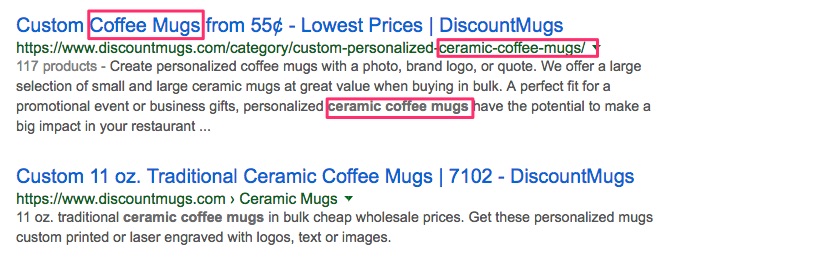
SEO generates site traffic by letting search engines know what your online store is all about — your products or service, your business' mission, your key customers. Search engines interpret the keywords you've included throughout your store to determine your site's content and whether your store is a relevant search result. For example, a search engine might list an online coffee mug shop high on a results page for the search "ceramic coffee mug" because the site contains those keywords in many of its product pages.
In the early days of SEO, site owners were able to draw site traffic easily by simply incorporating keywords and links with large search volumes. Not as many people were strategically incorporating keywords into their site, so those who were engaging in SEO could easily get their site on the search results page of frequently-searched keywords.
Today, SEO is not as easy since search engines now penalize the old practice of keyword stuffing. Over the past few years, search engine technology has improved to detect when keywords are being placed throughout a site in a non-helpful, out-of-context fashion for the sake of earning more traffic. The engines know that this keyword stuffing isn't useful to users, so now they focus on more relevant, useful applications of keywords as a basis for results page rankings.
Even with complex search engine algorithms, SEO can still be used to drive traffic to your store with the right groundwork. We'll lay that foundation in the following four steps to help you create a solid SEO strategy for your online store.
Step 1: Brainstorm Keyword IdeasTo start, write out a list of every keyword that you think your buyers might search to find your site. Don't focus too much on perfecting your list at this stage — you'll be refining it later when we move on to keyword research tools.
Brainstorm your keywords by thinking about what attracts people to your business. Your list of words and phrases should describe your product or service and highlight what makes your business unique and useful. Returning to the example of the online coffee mug shop, this store's keyword brainstorm list might include:
If you're feeling stuck, ask yourself these questions and shorten your answers into keywords:
Once you've got a full list, here are a few strategies for strengthening your keywords to make your store even easier to find.
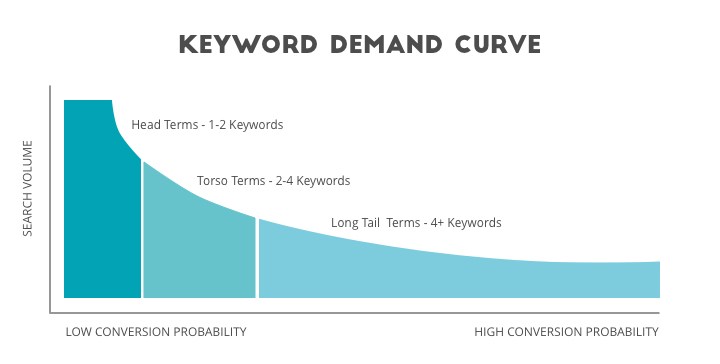
To make keywords longer, try adding adjectives. For example, a merchant who's selling water bottles could use the keyword "dishwasher-safe glass water bottles".
After brainstorming and refining your keyword list, you'll have a clear idea of your key buyers' common searches that are related to your product or service.
Step 2: Use Tools to Improve Your Keyword ListA journalist doesn't publish an article after only brainstorming. They need to fact-check their ideas before incorporating them into their work.
Likewise, your keyword brainstorm list is useless until you've checked whether your ideas are actually frequently searched phrases. Luckily, there are plenty of tools out there that show the search volume and difficulty, or competitiveness, of keywords. Ideally, you want to find keywords that have high search volumes and low difficulty to easily drive traffic to your online store. These tools also offer additional keyword data, such as the number of search results, that can inform your keyword choices as well.
To get started, here are a few major keyword tools to consider:
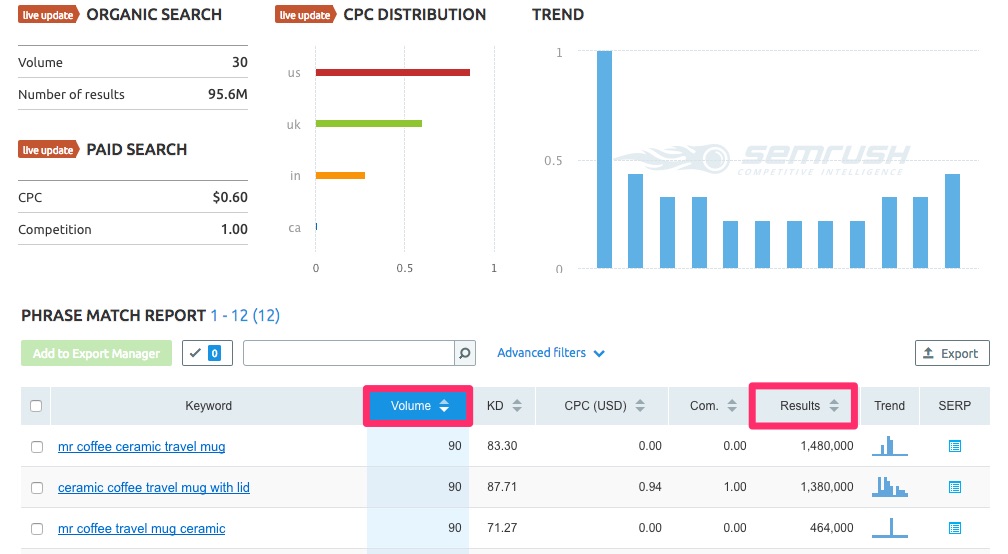
SEMRush is especially effective for assessing competitors by seeing which keywords are driving traffic to their sites with its Keyword Gap feature.
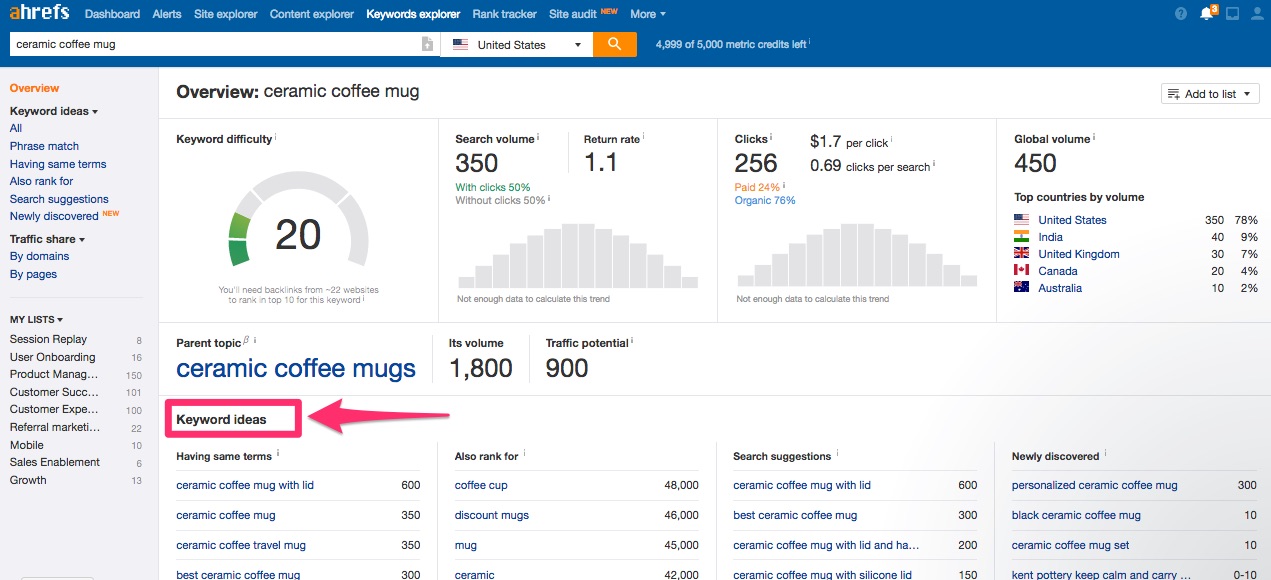
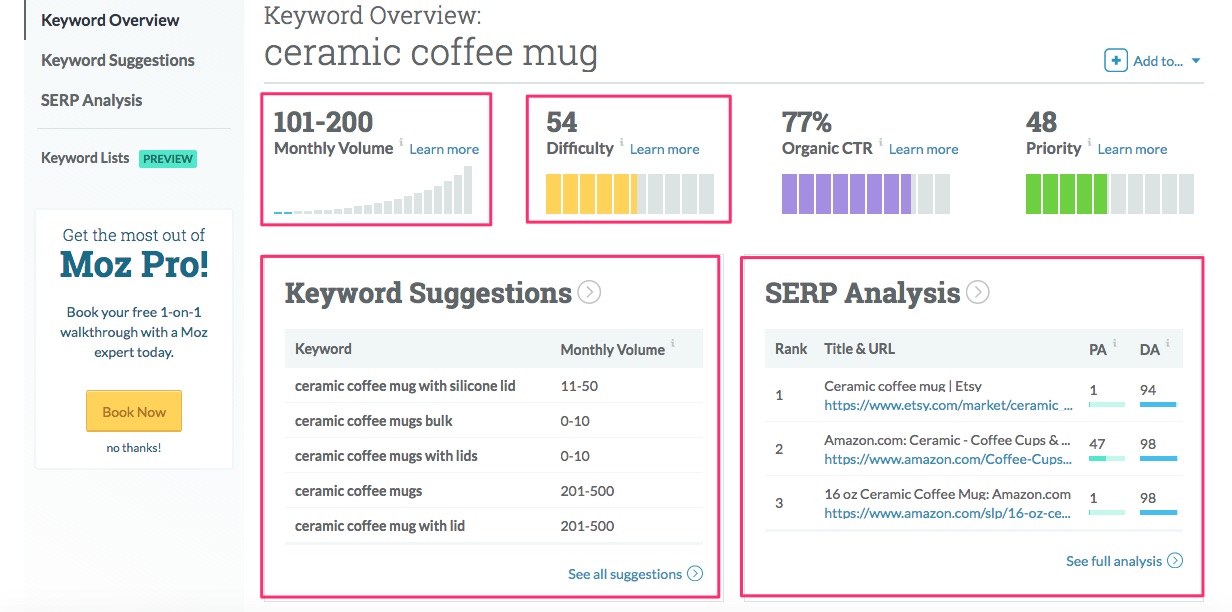 All of these tools have their merits and are widely used, so it's just a matter of picking one that meets your budget and your keyword research needs. Explore the different plans offered with each tool and consider which features are most important to you in your keyword research. With a chosen tool, you can improve your keyword list by checking the search volume, difficulty, and other stats for your phrases, a s well as adding new keywords from your tool's suggested phrases.
Your keyword list is finalized — now what? It's time to add in these phrases to different parts of your online store. With these keywords incorporated, search engines associate your store with the phrases you've added and list your store in search results when buyers search these keywords. With frequent and relevant usage of your selected keywords, your site will rank higher on their search result pages.
Here are the main areas of your online store where you should add keywords:
With these phrases included, search engines will associate your store with the keyword, and users will see your store as relevant in their search results since engines typically bold the keyword in the title.


Your domain name is probably just your business name (and probably not optimized for keywords), so ranking high on your site's homepage URL might be tough. Other store page URLs, however, are a great opportunity for adding in keywords since they don't need to be included in a succinct or engaging way.
 Though it's possible to include more than one H1 on a page, it's recommended that you only use one to avoid using too many keywords and diluting their ranking power.
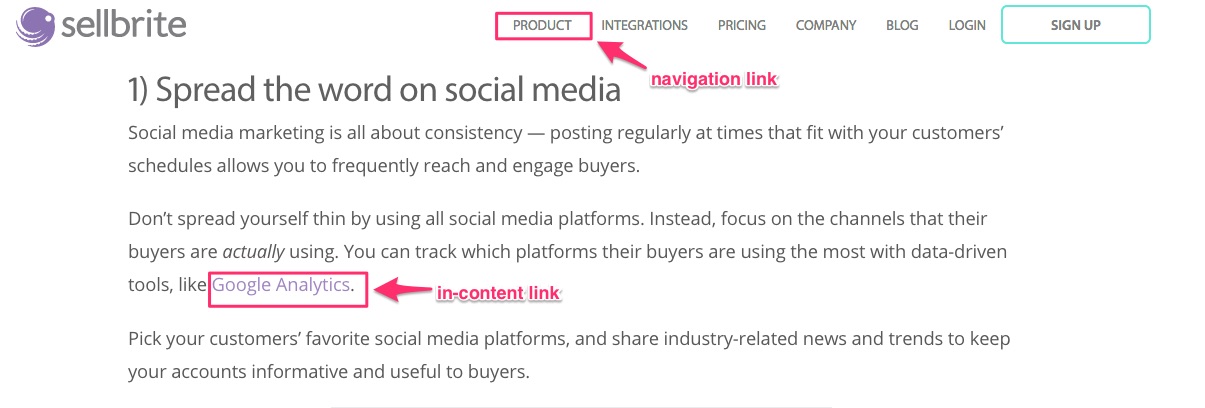
In general, it's more difficult to rank with navigation bar text links than with in-content text links since navigation bars typically have minimal text and aren't optimal for adding keywords. In-content text, however, is usually longer and more appropriate for adding keywords to rank higher on search results.
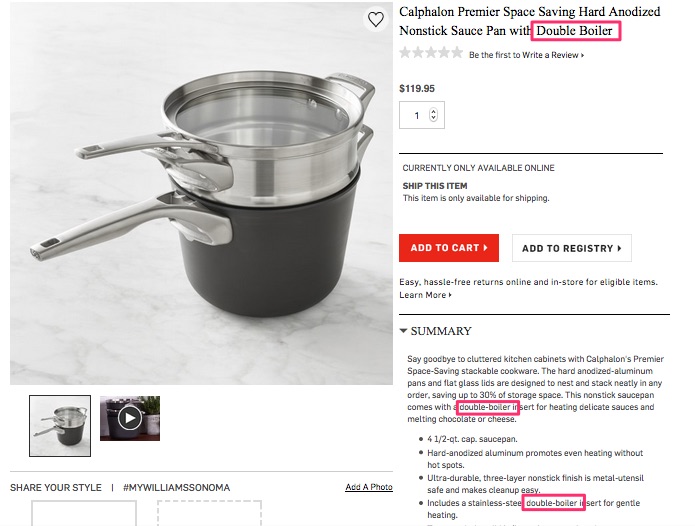
In just this product page, the keyword "double boiler" is included 3 times.
If you're using high search volume, competitive keywords, you'll have a better chance of ranking high if you find multiple natural opportunities to include the phrases in your body content. Be wary, however, of keyword stuffing as search engines now penalize for heavy out-of-context keyword usage.


Adding keywords in each of these areas can be easily done by your web designer who can edit your store's HTML code. If you've set up your store with an ecommerce platform, check your platform's rules for editing your store to add keywords. Here are a few resources for adding SEO keywords with different ecommerce platforms:
Including keywords throughout your online store makes it easier for you to reach your customers. When you add keywords in a useful, natural way to your site, search engines label your store as a relevant result for your buyers from their keyword searches. With this visibility, your store is easy for your customers to find so they can start their shopping.
Step 4: Measure Your Keywords' SuccessAfter all of this work, you'll want to know whether your SEO efforts are paying off. You can check to see whether your keyword inclusion is leading to more traffic with the following steps.
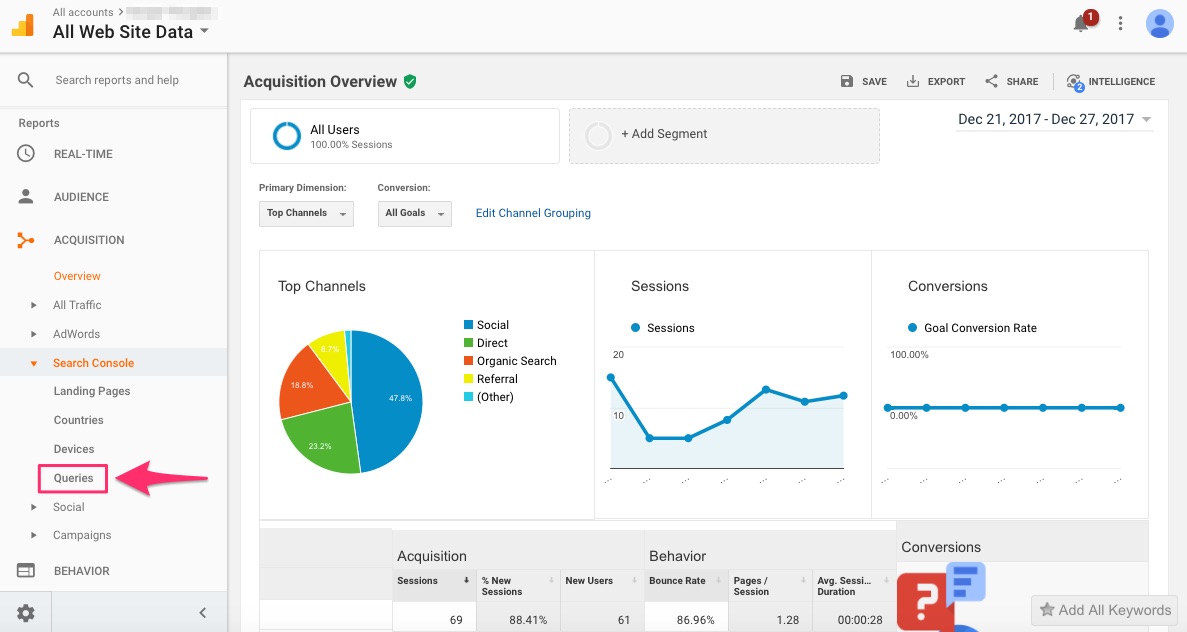
This section shows the queries that led to users viewing your store's URLs in Google's search results as well as the following metrics for each URL:
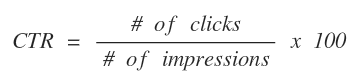 The metrics appear in a table for each query, as seen in the example below.
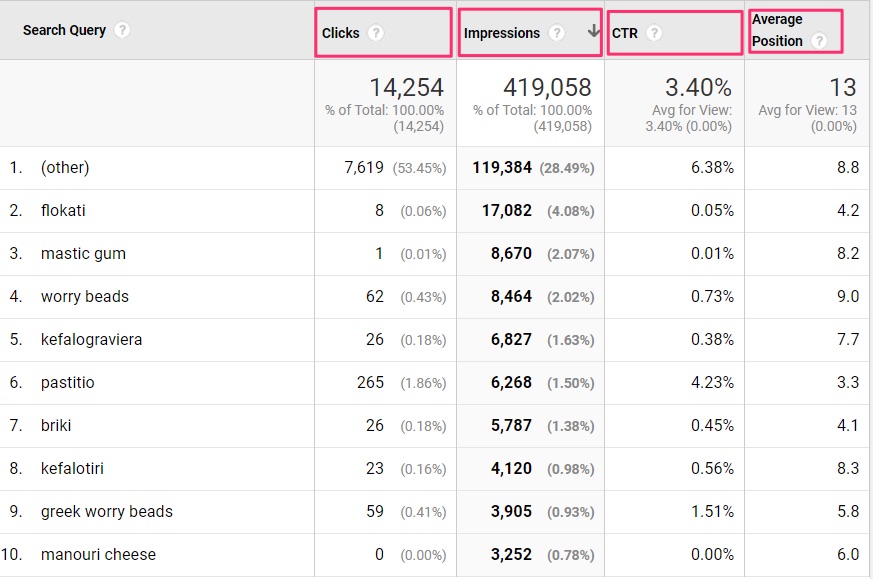
These metrics provide insights on which parts of your SEO strategy might need improvement. If the impressions and average position for a query are low, that keyword may be too competitive, or you need to incorporate the keyword more frequently and effectively into your site page. If the clicks for a query are low, you may need to edit your title tag and meta description to be more engaging so users feel motivated to visit your online store. Thinking about why one metric might be low will inform how you refine your SEO strategy to rank your store higher on search results.
Revisit Your SEO Strategy to Rank HigherSEO isn't a one-shot game — it has to be an ongoing practice of your business in order to increase your store's visibility. The rules of the SEO game have changed in the past few years: it's more difficult to rank with keywords now since there are more site owners utilizing SEO, and search engines today favor relevant keyword inclusions and penalize out-of-context keyword stuffing.
The rules are going to continually change as search engines constantly update their technology. Staying updated on these changes and continually revisiting the core parts of your SEO strategy, as outlined in this guide, will enable you to keep your store ranking high on search results, even as SEO competition intensifies.
The post Your Ecommerce SEO Strategy: How to Optimize Your Store appeared first on Sellbrite.
You have Successfully Subscribed!


0 comments: